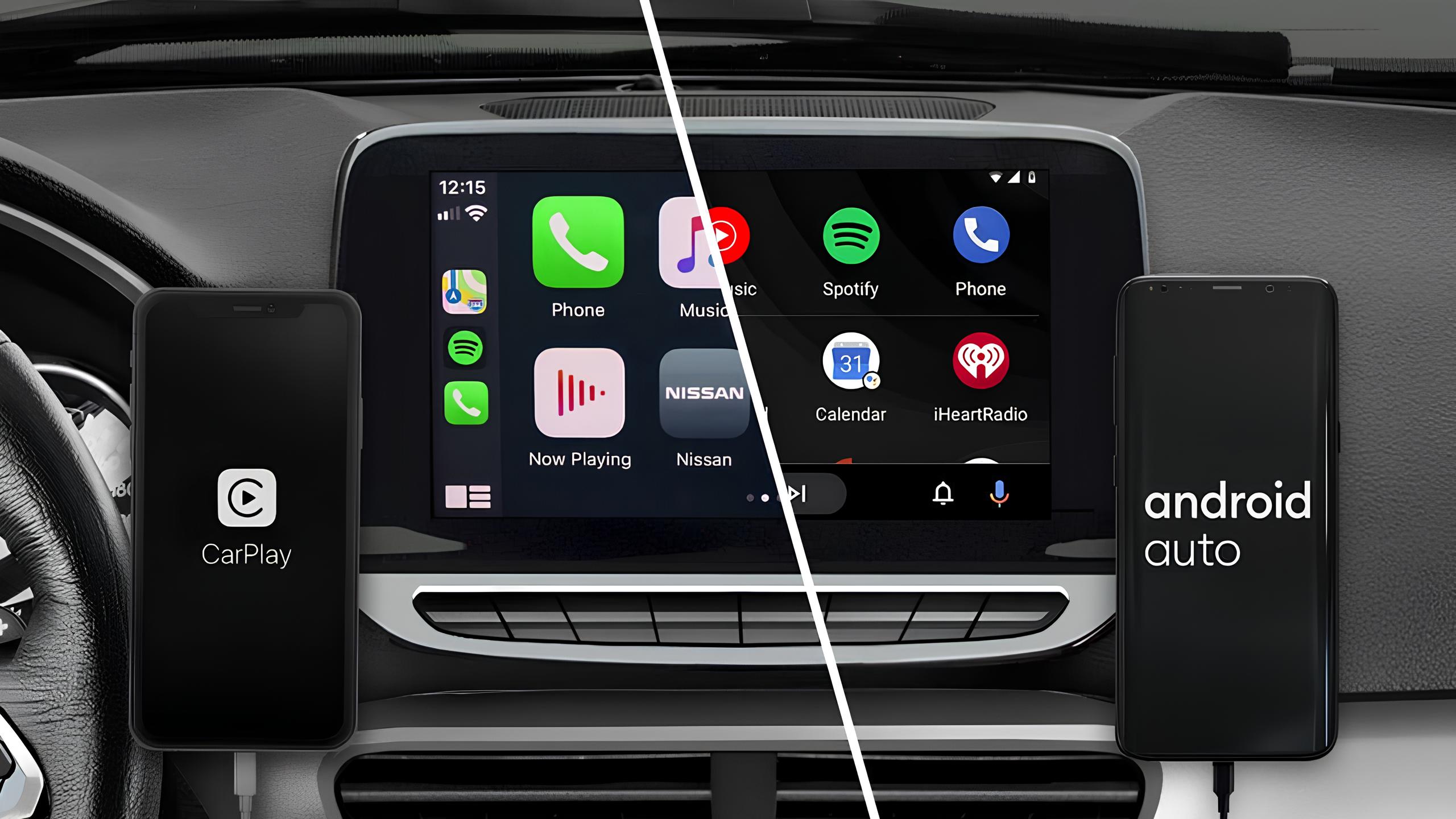
Modern cars are becoming increasingly connected. For many drivers, the infotainment system is now just as important as the engine, transmission, air conditioning and other vehicle systems.
Two of the most widely used smartphone integration platforms are Android Auto and Apple CarPlay. Both allow drivers to connect their smartphones to a compatible vehicle infotainment system and access navigation, music, calls, messages and other supported applications through the vehicle display.
But which is better: Android Auto or Apple CarPlay?
The answer depends largely on the smartphone you use, your preferred navigation and communication applications, the vehicle's infotainment system and the type of driving experience you want.
For drivers in Dubai, where navigation, traffic information, hands-free communication and reliable connectivity are particularly important, choosing the right system can make everyday driving more convenient.
Android Auto vs Apple CarPlay: Quick Comparison
| Feature | Android Auto | Apple CarPlay |
|---|---|---|
| Smartphone compatibility | Android phones | iPhone |
| Navigation | Google Maps, Waze and supported apps | Apple Maps, Google Maps, Waze and supported apps |
| Voice assistant | Google Assistant / supported Google AI features | Siri |
| Interface | Flexible and information-rich | Simple and consistent |
| Customization | Generally more flexible | More controlled |
| Messaging | Broad supported-app integration | Strong integration with Apple Messages and supported apps |
| Music | Wide range of supported applications | Wide range of supported applications |
| Wireless connection | Available on compatible vehicles and phones | Available on compatible vehicles and phones |
| Best suited for | Android ecosystem users | Apple ecosystem users |
There is no universal winner. Your smartphone ecosystem and the features supported by your vehicle should be the starting point when making a decision.
What Are Android Auto and Apple CarPlay?
Android Auto and Apple CarPlay are smartphone integration systems designed to bring selected smartphone functions onto a compatible vehicle infotainment display.
Instead of handling your phone while driving, you can use the vehicle's touchscreen, steering-wheel controls and voice commands to access supported functions.
Typical functions include:
- Turn-by-turn navigation
- Phone calls
- Music and audio
- Messaging
- Voice commands
- Contacts
- Podcasts and audiobooks
- Selected third-party applications
The exact functions available depend on the smartphone, operating system, vehicle, infotainment system and application.
For older vehicles, aftermarket upgrades can sometimes provide access to modern smartphone integration. However, compatibility should always be checked before installing or modifying an infotainment system.
Android Auto: What Does It Offer?
Android Auto is designed for Android smartphone users and integrates Google's ecosystem into compatible vehicle infotainment systems.
One of its biggest advantages is flexibility. Android Auto can provide access to navigation, music, messaging and other supported applications while allowing the driver to interact primarily through the vehicle display and voice controls.
Android Auto Navigation
Navigation is one of the most important reasons drivers use smartphone integration.
Android Auto provides access to applications such as Google Maps and Waze on compatible systems.
Google Maps can provide:
- Turn-by-turn navigation
- Traffic information
- Alternative routes
- Points of interest
- Business information
- Destination information
Waze can provide community-based traffic and road information where supported.
This can be particularly useful in Dubai, where traffic conditions can change quickly and route selection can significantly affect travel time.
Apple CarPlay: What Does It Offer?
Apple CarPlay is designed for iPhone users and provides a simplified interface for accessing selected iPhone functions through a compatible vehicle infotainment system.
CarPlay focuses heavily on consistency and ease of use. Drivers familiar with the iPhone ecosystem can generally understand the interface quickly.
Supported functions can include:
- Apple Maps
- Google Maps
- Waze
- Phone calls
- Messages
- Music
- Podcasts
- Siri voice commands
- Other supported applications
The available features vary according to the vehicle and software configuration.
Android Auto vs Apple CarPlay for Navigation
Navigation is often the deciding factor for drivers.
Android Auto has a strong connection with Google's navigation ecosystem, particularly Google Maps and Waze.
Apple CarPlay uses Apple Maps as its native mapping solution but also supports third-party navigation applications such as Google Maps and Waze where available.
Therefore, an iPhone user does not necessarily have to use Apple Maps.
Which Has Better Navigation?
There is no simple answer.
Drivers who rely heavily on Google services may prefer Android Auto because of its close integration with the Google ecosystem.
iPhone users who prefer the Apple ecosystem may find Apple Maps and Siri convenient.
For Dubai driving, however, the most important consideration is often the navigation application itself rather than simply choosing Android Auto or CarPlay.
Android Auto vs Apple CarPlay: Interface and Ease of Use
The two platforms take different approaches to interface design.
Apple CarPlay
CarPlay emphasizes:
- Simplicity
- Familiar iPhone-style interaction
- Large, recognizable controls
- Consistent interface design
- Reduced visual complexity
This makes it attractive to drivers who prefer a straightforward interface.
Android Auto
Android Auto generally provides a more information-rich experience.
Depending on the version and vehicle display, drivers can have navigation, media controls and other information available without constantly switching between screens.
Android Auto also provides more flexibility in some areas of personalization.
Which Interface Is Better?
It is mostly a matter of preference.
If you prefer a controlled and simple interface, CarPlay may feel more natural.
If you prefer flexibility and more information on screen, Android Auto may be the better choice.
Voice Control: Android Auto vs Apple CarPlay
Voice control is particularly important because it allows drivers to perform certain tasks without manually operating the infotainment screen.
Android Auto uses Google's voice-assistant ecosystem, while Apple CarPlay uses Siri.
Voice commands can be used for supported functions such as:
- Making phone calls
- Starting navigation
- Sending messages
- Playing music
- Checking information
- Managing supported tasks
The effectiveness of voice commands depends on the smartphone, software version, internet connection, vehicle microphone system and supported application.
For drivers, the main advantage is reducing the need to interact manually with the screen while the vehicle is moving.
App Support and Smartphone Integration
Both platforms support a range of applications, although their ecosystems and supported applications differ.
Common categories include:
- Music streaming
- Navigation
- Podcasts
- Audiobooks
- Messaging
- Communication
- Productivity applications
Android Auto generally offers considerable flexibility through the Android ecosystem, while CarPlay maintains a more controlled application environment.
The number and availability of supported applications can change as Google, Apple and application developers introduce new features.
Android Auto vs Apple CarPlay: Connection and Performance
Connection reliability is another important consideration.
Both wired and wireless configurations are available depending on the vehicle and smartphone.
Wireless connectivity is convenient because drivers do not need to connect a cable every time they enter the vehicle. However, wireless performance can be affected by:
- Smartphone compatibility
- Vehicle infotainment hardware
- Software versions
- Wireless connectivity
- Vehicle-specific implementation
- Smartphone battery condition
- System configuration
Older factory infotainment systems may also have limitations that affect smartphone integration.
If an older vehicle experiences repeated connection problems, the issue may not necessarily be the smartphone platform itself. The vehicle's infotainment hardware, software or communication system may need to be inspected.
Can You Add Apple CarPlay or Android Auto to an Older Car?
In many cases, an older vehicle can be upgraded, but compatibility needs to be checked carefully.
Possible solutions may include:
- Compatible smartphone integration modules
- Replacement infotainment systems
- Compatible aftermarket displays
- Vehicle-specific multimedia systems
The correct solution depends on the vehicle's make, model, year and existing infotainment architecture.
This is especially important for premium and European vehicles because the infotainment system may communicate with other vehicle systems, including steering-wheel controls, factory cameras and other electronics.
A poorly matched aftermarket installation can create compatibility problems.
CarPlay and Android Auto in European and Luxury Cars
European vehicles often use sophisticated electronic and infotainment architectures.
Models from brands such as:
- BMW
- Mercedes-Benz
- Audi
- Porsche
- Range Rover
- Land Rover
- Volkswagen
- Volvo
- Jaguar
can have different infotainment generations depending on the model year and market specification.
Before upgrading an older European vehicle, it is important to identify the existing infotainment system and determine what type of integration is technically compatible.
At Euro Haus AutoCare in Dubai Investment Park 1, our automotive technicians work with European, German, American and Japanese vehicles and can inspect vehicle electronics and diagnose infotainment-related issues as part of a broader vehicle inspection.
Common Apple CarPlay and Android Auto Problems
Smartphone integration is convenient, but problems can occur.
Common complaints include:
1. Connection Drops
The phone may repeatedly disconnect from the vehicle.
Possible causes include software compatibility, wireless communication problems, USB connection issues or vehicle infotainment faults.
2. System Does Not Connect Automatically
Sometimes the smartphone may not establish the expected connection when the vehicle starts.
Checking Bluetooth, Wi-Fi, USB connections and device permissions can help identify the problem.
3. Screen Freezes or Becomes Slow
Slow response can be related to the smartphone, infotainment system, software or hardware limitations.
4. Audio Problems
Drivers may experience:
- No audio
- Low volume
- Intermittent audio
- Audio switching between devices
The problem may originate from either the smartphone or vehicle audio system.
5. Microphone or Voice Command Problems
Poor microphone performance can affect phone calls and voice commands.
In some vehicles, microphone faults or infotainment issues may require professional diagnosis.
6. Factory Camera or Steering Controls Stop Working After an Upgrade
This can occur when an aftermarket infotainment system or integration module is not correctly matched to the vehicle.
Proper compatibility checking and installation are important.
Is Apple CarPlay Better Than Android Auto?
Not necessarily.
Apple CarPlay is often the natural choice for iPhone users who value simplicity, consistency and integration with Apple's ecosystem.
Android Auto may be preferable for Android smartphone users who want greater flexibility, Google ecosystem integration and extensive customization.
The best choice depends on:
- Your smartphone
- Your vehicle
- Your infotainment system
- Your preferred navigation application
- Your preferred communication and music applications
- Whether you want wired or wireless connectivity
Which Is Better for Dubai Drivers?
For Dubai drivers, both systems can provide significant advantages.
Navigation is particularly useful because traffic conditions can vary throughout the day. Access to real-time route information can help drivers choose more suitable routes.
Hands-free calling and messaging can also reduce the need to manually operate a smartphone while driving.
For drivers using older European or luxury vehicles, the condition and compatibility of the factory infotainment system should also be considered.
A modern smartphone cannot compensate for a faulty or outdated vehicle infotainment system.
When Should You Have Your Car's Infotainment System Checked?
Consider having the system inspected if you experience:
- Repeated CarPlay or Android Auto disconnections
- Bluetooth problems
- USB connection failures
- Infotainment screen freezing
- Audio interruptions
- Microphone problems
- Steering-wheel control issues
- Factory camera problems after an infotainment upgrade
- Warning messages related to vehicle electronics
- Multiple electrical or communication faults
A proper diagnostic inspection can help determine whether the problem is related to the smartphone, infotainment system, wiring, communication modules or another vehicle electronic component.
The Future of Android Auto and Apple CarPlay
Vehicle connectivity continues to evolve.
Future developments are expected to focus on:
- More advanced artificial intelligence
- Improved voice interaction
- Better wireless connectivity
- Deeper vehicle integration
- Enhanced navigation
- Electric vehicle information
- Personalized interfaces
- Multiple-display integration
The source material also highlights the development of next-generation CarPlay and the growing use of AI technologies in Android Auto, showing that smartphone integration is moving beyond simple phone mirroring toward more connected vehicle experiences.
As vehicles become increasingly software-driven, infotainment systems will become more closely connected with other vehicle functions.
Frequently Asked Questions
Is Android Auto better than Apple CarPlay?
Neither is universally better. Android Auto is designed for Android smartphones, while Apple CarPlay is designed for iPhones. The better option depends primarily on your smartphone ecosystem and vehicle compatibility.
Can I use Google Maps with Apple CarPlay?
Yes. Google Maps is supported on compatible Apple CarPlay systems.
Can I use Waze with Android Auto?
Yes, Waze is supported on compatible Android Auto systems.
Can an old BMW get Apple CarPlay?
Some older BMW models can be upgraded, depending on the infotainment system, model year and existing vehicle configuration. Compatibility should be checked before purchasing an upgrade.
Can Mercedes-Benz cars use Android Auto?
Many compatible Mercedes-Benz models support Android Auto, but availability depends on model year, infotainment system and market specification.
Can I add Android Auto to an older Audi?
Some older Audi vehicles can be upgraded with compatible smartphone integration solutions. The exact solution depends on the vehicle's infotainment system.
Why does my Apple CarPlay keep disconnecting?
Possible causes include USB connection problems, wireless connectivity issues, smartphone software, vehicle infotainment software or hardware faults. If the problem persists, professional diagnosis may be appropriate.
Why does Android Auto keep disconnecting?
Possible causes include phone compatibility, wireless connectivity, USB issues, software problems or faults within the vehicle infotainment system.
Does Euro Haus AutoCare diagnose electrical and infotainment problems?
Euro Haus AutoCare in Dubai Investment Park 1 provides vehicle diagnostics and electrical-system inspection for supported vehicles. Our team works with European, German, American and Japanese vehicles and uses advanced diagnostic equipment to identify vehicle faults.
Android Auto vs Apple CarPlay: Final Verdict
There is no single winner in the Android Auto vs Apple CarPlay comparison.
Choose Apple CarPlay if you:
- Use an iPhone
- Prefer Apple's ecosystem
- Want a simple and consistent interface
- Regularly use Apple services
Choose Android Auto if you:
- Use an Android smartphone
- Rely heavily on Google services
- Prefer greater customization
- Want broad access to supported Android applications
For an older vehicle, however, the most important question may not be which platform is better. It may be which system is compatible with your vehicle's existing electronics and infotainment architecture.
Before replacing or modifying an infotainment system, identify the vehicle's make, model, year and existing multimedia system.
Need Help With Your Vehicle's Electronics?
Euro Haus AutoCare is a premium independent auto repair and diagnostics workshop in Dubai Investment Park 1 (DIP 1), Dubai.
We service and diagnose a wide range of European, German, American and Japanese vehicles, including BMW, Mercedes-Benz, Audi, Porsche, Range Rover, Land Rover, Volkswagen, Dodge and other premium vehicles.
Our services include:
- Advanced vehicle diagnostics
- Electrical system diagnosis
- Major and minor servicing
- Engine diagnostics and repair
- Transmission service and repair
- Brake service
- Air-conditioning service
- Vehicle inspections
- Preventive maintenance
Free vehicle inspection is available for applicable services.
Euro Haus AutoCare also offers free pickup and drop-off within Dubai, subject to service availability.
Visit Euro Haus AutoCare in Dubai Investment Park 1 for professional vehicle diagnostics and automotive service.